
Lab 3 · Observe
Goal
See every tool call that goes through the router, in an access log and in traces, with the calling agent's identity on it. By the end you can investigate a denied tool call from logs and traces: who, when, which tool, and what happened.
Recall
In Lab 2, release-bot tried to deploy to production and the router answered 403. You saw it because you were watching the terminal. Could you prove it tomorrow?
Predict
Which of these can you answer from the router's telemetry, out of the box?
- Which agent called which tool?
- With what arguments?
- How long did each call take?
- Was the call allowed?
Reveal the answer
Out of the box: 3 and 4, plus the tool, the server and the agent's session. Not 1: the router validates the token but doesn't write the identity into logs or spans until you tell it to. That's this lab's Modify step. Not 2 either: tool arguments can hold secrets and personal data, so they're off by default. See Explore.
Run
You need two terminals for this lab. In a Codespace, click the split icon (or +) at the top right of the terminal panel.
In the first terminal, start Lab 3. It uses the policy from the end of Lab 2, with telemetry turned on:
./lab start 3$ ./lab start 3
✓ Lab 3 — Observe → workspace/mcproute.yaml + workspace/telemetry.env
› Checking the MCP servers
› Starting Agent Router
✓ Agent Router is up → MCP endpoint http://localhost:1975/mcp
✓ Telemetry → traces to http://localhost:4318, metrics at http://localhost:1064/metrics
› The router requires a token now — try ./lab tools --as triage-botIn the second terminal, open otel-tui, a trace viewer for the terminal. Leave it running:
./lab otelBack in the first terminal, run the normal task and the production attempt, then read the access log:
./lab agent --as release-bot
./lab agent --as release-bot --task "Deploy checkout 1.4.3 to production"
./lab logs$ ./lab logs
time agent session code latency what
19:30:05 — 401 0ms rejected: no valid token
19:30:06 — 24f80959 200 3ms tools/list ci
19:30:06 — 24f80959 200 4ms tools/list chat
19:30:06 — 24f80959 200 6ms tools/list docs
19:30:06 — 24f80959 200 8ms tools/list issues
19:30:06 — 24f80959 200 9ms tools/list deploy
19:30:06 — 24f80959 200 1ms tools/call issues__get_issue
19:30:06 — 24f80959 200 1ms tools/call ci__list_pipeline_runs
…
19:30:07 — 24f80959 200 1ms tools/call chat__post_message
19:30:11 — 60123edb 200 8ms tools/list chat
…
19:30:11 — 60123edb 200 1ms tools/call issues__add_comment
19:30:11 — 60123edb 403 15ms denied by policy (which tool? → look at the trace)
19:30:11 — 60123edb 200 1ms tools/call chat__post_message
57 lines in .lab/access.log (hiding initialize/notifications — show them with --all). Envoy flushes the log about once a second.Log empty? Envoy writes it about once a second. Wait a moment and run ./lab logs again. ./lab logs -f keeps following it.
Investigate
In the access log (./lab logs):
- Each line is one MCP request the router handled: time, agent, session, status code, latency, and the MCP method with the backend or tool. Why are there five
tools/listlines at the start of each session? - The first line is a
401. Where did that come from? (Hint: something checked whether the router needs a token.) - Find the
403. It tells you when, and which session. What's missing?
In otel-tui (second terminal), open the Traces tab. Each agent run is one trace, from the agent's service ship-it-agent:
- The root span is
invoke_agent ship-it: the whole run. - Under it, the agent records one
execute_tool <tool>span per tool call. - The router adds its own span for every MCP request it handles:
ListToolswhen the agent lists tools, andCallToolinside eachexecute_toolspan. Agent and router spans share one trace because the agent sends atraceparentheader with every request.
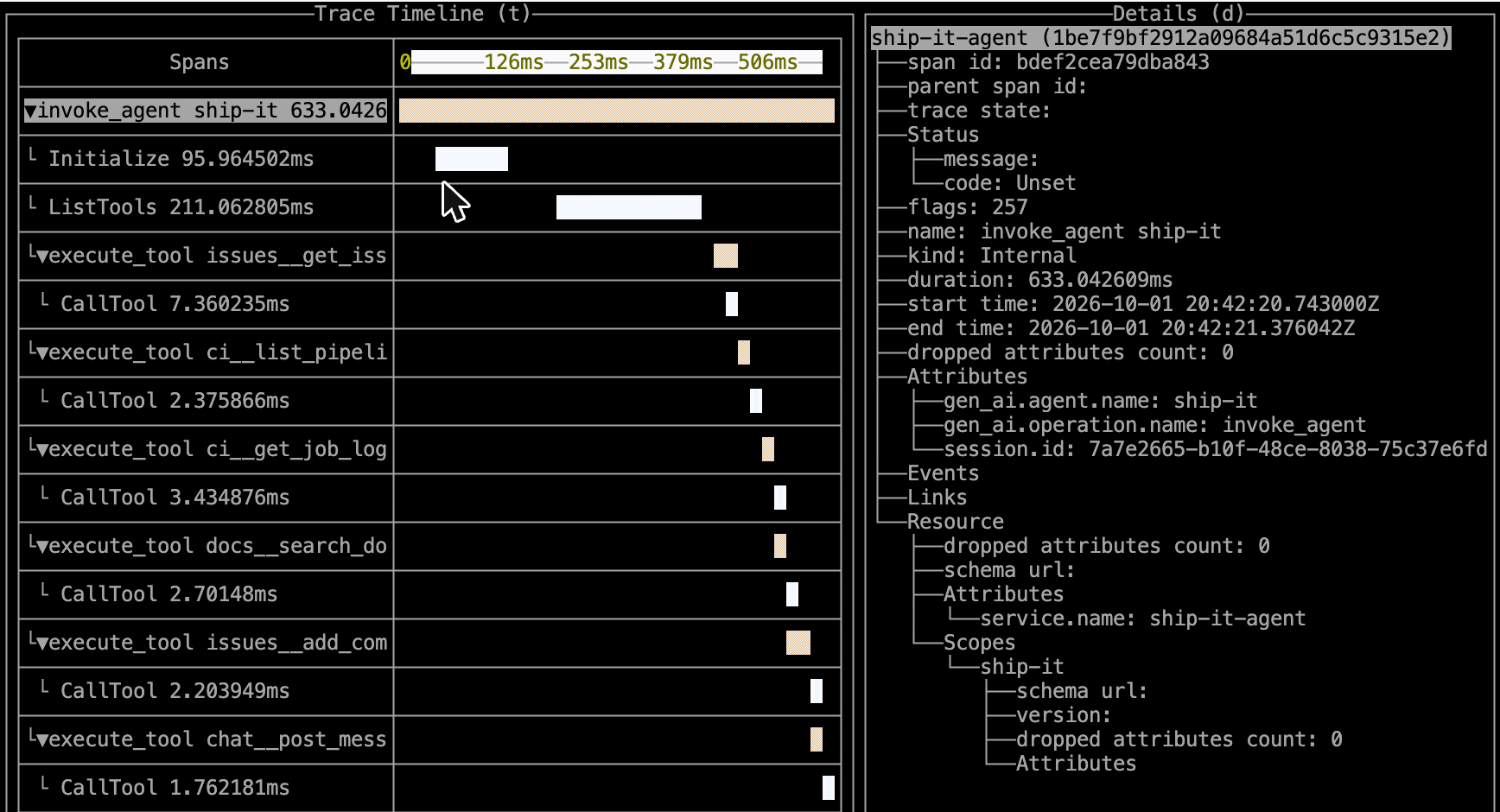
In otel-tui: arrow keys move, Enter opens a trace, Esc goes back, Ctrl+C quits.
Open the trace of the production run. Find the span that is marked as an error, select it, and read its status and attributes.
- Which tool did the router refuse? Which span says so?
- What does the error status on the router's span say? How is it different from the agent's
execute_toolspan above it?
Reveal: the denied span, as captured in a Codespace
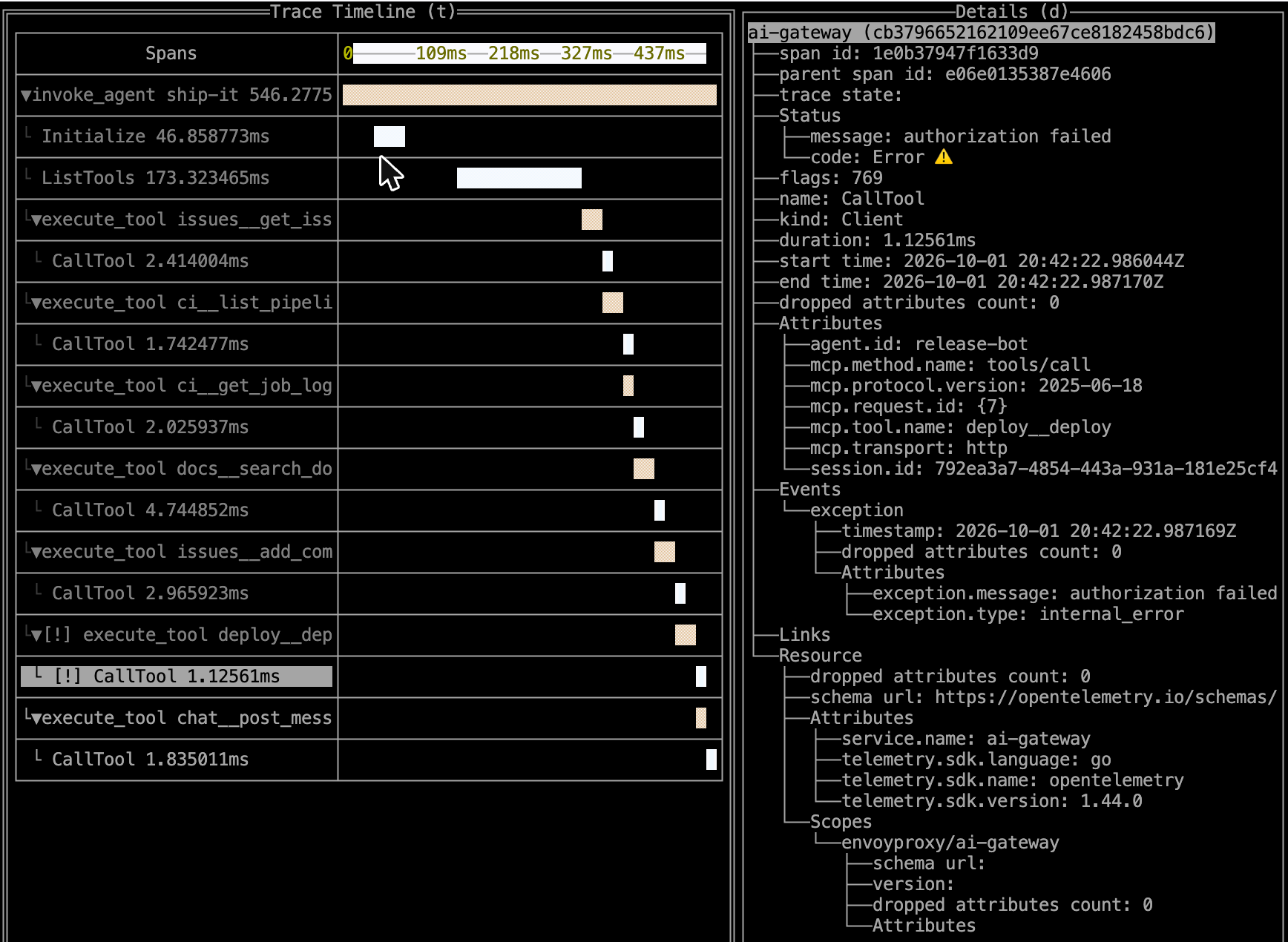
The router's CallTool span carries status Error: authorization failed, plus agent.id: release-bot, mcp.tool.name: deploy__deploy and the run's session.id. The agent's own execute_tool span above it only knows it got a 403.
Ask your coding agent (optional)
"Using only .lab/access.log, what can you tell me about the denied call, and what can't you?" Compare its answer with the trace you just opened. Knowing which signal answers which question is the point of this lab. Set up your agent.
Finally, ask the checkpoint what it thinks:
./lab check 3$ ./lab check 3 --no-quiz
▌ Lab 3 checkpoint — Observe
✓ The router is running with workspace/telemetry.env
! Nothing is listening on :4318 — open a second terminal and run ./lab otel to see traces
✗ Tool calls are logged, but agent.id is empty
↳ Step 1: uncomment claimToHeaders under securityPolicy.oauth. Step 2: uncomment OTEL_AIGW_REQUEST_HEADER_ATTRIBUTES in workspace/telemetry.env. Then ./lab run
✓ The log shows 1 call(s) denied by policy
Not there yet. Fix the ✗ items above and run ./lab check 3 again.This capture ran without otel-tui, hence the ! warning. With otel-tui open, that line is a ✓.
Answers
- When an agent lists tools, the router asks all five servers and merges the answers. One
tools/listper server. - From
./lab runitself: it asks the router for its tool list without a token, to tell you whether one is needed. - The who (agent column:
—) and the which tool. The router refused the call at the front door, before it handed the request to a backend, so the log line has no tool name. The trace has it. deploy__deploy. The router'sCallToolspan for it, inside the agent'sexecute_tool deploy__deployspan.- The router's span says authorization failed. The agent's span says what the agent experienced: denied by policy (HTTP 403). Two views of one event, in one trace.
Modify — Step 1: put the identity on the request
In workspace/mcproute.yaml, under securityPolicy.oauth, uncomment claimToHeaders:
    oauth:
      issuer: https://auth.lakeshore.example
      audiences: [http://localhost:1975/mcp]
      jwks:
        localJWKS: # the workshop's public key set (labs/keys/jwks.json)
          # …
      claimToHeaders:
        - claim: sub
          header: x-agent-id
      protectedResourceMetadata:
        # …
After validating a token, the router copies its sub claim (release-bot) into an x-agent-id request header. A client can't forge it: the router removes any x-agent-id the client sent. The MCP servers receive the header too, so they also know who is calling.
./lab runModify — Step 2: turn the header into telemetry
Open workspace/telemetry.env, the router's telemetry settings. Uncomment one line:
# ✏️ Modify, step 2 — map the x-agent-id header to an `agent.id` attribute on
# spans, metrics and access-log lines. Uncomment:
OTEL_AIGW_REQUEST_HEADER_ATTRIBUTES=x-agent-id:agent.id
The format is header:attribute. The router now records the header as agent.id on every span, metric and access-log line.
./lab runDid only one of the two steps work? ./lab check 3 tells you which one is missing:
✗ Tool calls are logged, but agent.id is empty
  ↳ x-agent-id is set (step 1 ✓) — now map it to agent.id in workspace/telemetry.env (step 2) and ./lab run
Checkpoint
The router starts a fresh log when it restarts, so run both agents again. Then look at the log:
./lab agent --as triage-bot
./lab agent --as release-bot --task "Deploy checkout 1.4.3 to production"
./lab logs$ ./lab logs
time agent session code latency what
19:30:35 — 401 0ms rejected: no valid token
19:30:36 triage-bot 1c216636 200 3ms tools/list deploy
…
19:30:36 triage-bot 1c216636 200 1ms tools/call issues__get_issue
19:30:36 triage-bot 1c216636 200 1ms tools/call ci__list_pipeline_runs
19:30:36 triage-bot 1c216636 200 1ms tools/call ci__get_job_logs
19:30:36 triage-bot 1c216636 200 1ms tools/call docs__search_docs
19:30:36 triage-bot 1c216636 200 1ms tools/call issues__add_comment
19:30:36 triage-bot 1c216636 200 1ms tools/call chat__post_message
19:30:40 release-bot df77850b 200 2ms tools/list deploy
…
19:30:40 release-bot df77850b 200 1ms tools/call issues__add_comment
19:30:40 release-bot df77850b 403 16ms denied by policy (which tool? → look at the trace)
19:30:40 release-bot df77850b 200 1ms tools/call chat__post_messageEvery line now says who. Now run the checkpoint:
./lab check 3$ ./lab check 3 --no-quiz
▌ Lab 3 checkpoint — Observe
✓ The router is running with workspace/telemetry.env
! Nothing is listening on :4318 — open a second terminal and run ./lab otel to see traces
✓ Your access log knows who called what: 6 calls by triage-bot, 6 calls by release-bot
✓ The log shows 1 call(s) denied by policy
✓ Lab 3 checkpoint reached. Nice work!
→ Stretch: curl -s localhost:1064/metrics | grep mcp_method_count_total — calls per backend, method and status
→ Wrap-up: bring your own agent → see the lab site's last pageYour agent made a real tool call through the router, and now the router can tell you which agent made each one.
In your terminal, ./lab check 3 then asks three investigation questions (the capture above skipped them with --no-quiz). Answer from your telemetry, not from memory:
- Which agent tried to deploy to production?
- Which tool did the router refuse to call?
- What does that span's error status say?
Reveal the answers
release-bot. The403line in./lab logscarries itsagent.id.deploy__deploy. The log says that a call was denied; the trace says which tool.- "authorization failed", on the router's span for the denied
tools/call.
Make · Stretch
Metrics. The router also counts calls. Its Prometheus endpoint is on port 1064:
curl -s localhost:1064/metrics | grep -E "^mcp_" | head -20mcp_capabilities_negotiated_total{agent_id="release-bot",capability_side="server",capability_type="tools",mcp_backend="chat",…} 1
mcp_capabilities_negotiated_total{agent_id="release-bot",capability_side="server",capability_type="tools",mcp_backend="ci",…} 1
…
mcp_initialization_duration_token_sum{agent_id="release-bot",mcp_backend="chat",…} 0.005032708
mcp_initialization_duration_token_count{agent_id="release-bot",mcp_backend="chat",…} 1
…Every series carries agent_id, thanks to your Modify step. Now find the per-method counts and latencies:
curl -s localhost:1064/metrics | grep mcp_method_count_total
curl -s localhost:1064/metrics | grep mcp_request_durationmcp_method_count_totalhas the labelsmcp_backend,mcp_method_nameandstatus. Which agent made the mosttools/callrequests, and to which backend?mcp_request_durationis a histogram of request latency.
(The _token in mcp_initialization_duration_token_* is a mislabelled unit upstream. It's a duration in seconds.)
Metrics carry agent_id but never session.id. Why would that be? Hint: think about how many distinct sessions a busy router sees in a day.
Span names. Telemetry vocabularies are still settling. In workspace/telemetry.env, uncomment AI_GATEWAY_TRACING_SEMCONV=gen_ai, run ./lab run, run the production attempt again and compare traces in otel-tui. The router's spans now follow the OpenTelemetry GenAI and MCP semantic conventions: CallTool becomes tools/call <tool>, and errors get an error.type attribute. Is error.type on the denied span as specific as the 403 in the log?
Answers
- Session ids are unbounded. One label value per session would explode the number of series in Prometheus. Identities like
agent_idare a small, stable set, so they make good labels. Session ids belong on spans and log lines. - At the time of writing, the denied call's
error.typeisinternal_error: less precise than the log's403. Check more than one signal.
Explore · take-home
- Use your own tracing backend. Anything that accepts OTLP over HTTP works. Change
OTEL_EXPORTER_OTLP_ENDPOINTinworkspace/telemetry.env, then./lab run; the agent picks up the same setting. On a machine with Docker, Jaeger listens on the same port 4318 as otel-tui (stop otel-tui first), with its UI on port 16686. Arize Phoenix is built for LLM and agent traces. The Agent Router repository ships a Grafana dashboard for its LLM (gen_ai_*) metrics. It doesn't chart themcp_*metrics from this lab yet, so add panels for those yourself. - Let MCP servers join the trace. The router also writes the trace context into each MCP request's
_metafield. An MCP server that reads it can add its own spans to the same trace, so one trace covers agent, router and server. - Tool arguments, and privacy. With
AI_GATEWAY_TRACING_SEMCONV=gen_ai, settingOTEL_INSTRUMENTATION_GENAI_CAPTURE_MESSAGE_CONTENT=truerecords tool-call arguments and results on spans. That answers "with what arguments?", but arguments can carry secrets, customer data and prompts. Decide who may read your traces before you turn it on. See tracing, metrics and access logs in the Agent Router docs.
Stuck?
Hint 1
There are two edits in two files, and both are marked ✏️ Modify in comments: claimToHeaders in workspace/mcproute.yaml, and OTEL_AIGW_REQUEST_HEADER_ATTRIBUTES in workspace/telemetry.env. Run ./lab run after editing.
Hint 2
Did both edits and agent.id is still empty? The log restarts with the router. Run the agent again, wait a second for Envoy to flush the log, then ./lab check 3. In the YAML, claimToHeaders sits at the same indentation as jwks and protectedResourceMetadata, inside oauth.
Reveal the answer
workspace/mcproute.yaml:
      claimToHeaders:
        - claim: sub
header: x-agent-idworkspace/telemetry.env:
OTEL_AIGW_REQUEST_HEADER_ATTRIBUTES=x-agent-id:agent.idStill stuck, or short on time? Apply the solution, then run the production attempt again so there is something to investigate:
./lab solution 3
./lab agent --as release-bot --task "Deploy checkout 1.4.3 to production"
Reflect
- The
403line in the access log told you who and when, but not which tool. Why not, and where did you find the rest? - You put
agent.idon logs, spans and metrics. Name one thing you would not put into telemetry by default, and why.
Reveal the answers
- The router refused the request before it chose a backend, so the log line has no MCP details. The trace has them: the router's span for that
tools/callnames the tool and says "authorization failed". Logs answer "what happened, when, by whom"; traces answer "what exactly, in what order". - Tool arguments and results: they can contain secrets and personal data. Or session ids as metric labels: they create a new series per session.
Next
Every lab ended with the sample agent making real tool calls through the router. Now point your own agent at it: Wrap-up · Bring your own agent.